


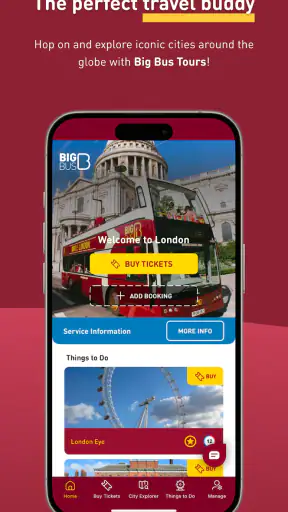
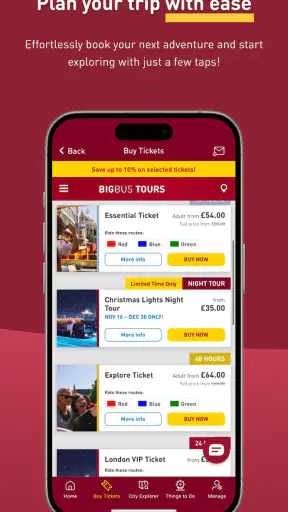
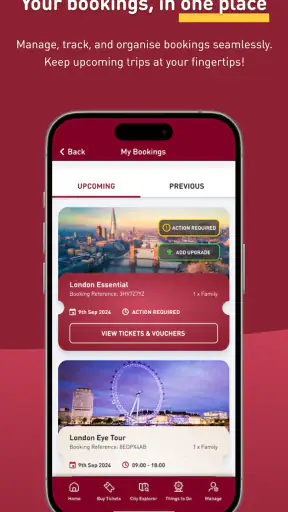
I used Big Bus Tours: Hop On, Hop Off as a practical companion for sightseeing rather than treating it like a simple travel brochure. The app comes from BIG BUS TOURS LTD and sits in the Travel & Local category, where its job is to help visitors understand the bus network, find stops, manage tickets, and connect a sightseeing ride with nearby attractions. That focus makes it most useful during a city break, when the main problem is not finding things to do but working out how to reach them without losing half the day.
The app is free to install, which is the clearest part of its value. That does not make every sightseeing activity free, of course: the bus tour and any attraction tickets still depend on what you choose to purchase. I see the app as a free planning and in-trip tool around the paid tour experience, not as a replacement for the ticket itself. That distinction matters if you are comparing it with a general map app or deciding whether downloading it alone gives access to the buses.
How Big Bus Tours works when you are actually sightseeing
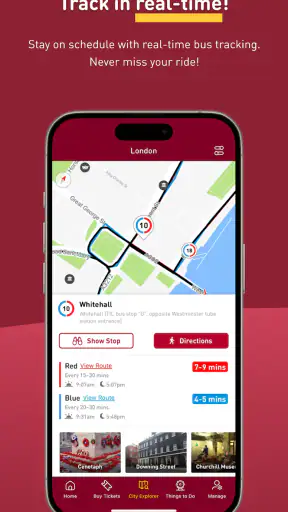
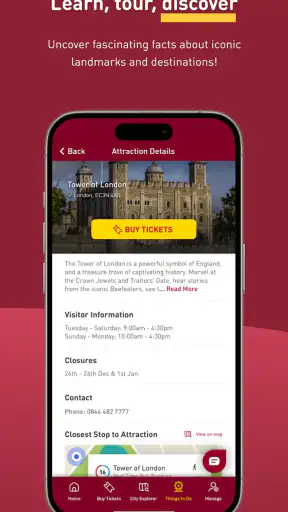
The central idea is straightforward. You use the app to look at city maps, identify the sightseeing route, check bus positions in real time, and explore tickets and attractions in the same place. In practice, that combination is more useful than any one feature by itself. A route map tells me where I could go, but live tracking helps me decide whether waiting at a stop makes sense right now. Ticket and attraction information then helps me turn that route into a day plan instead of riding around without a clear purpose.
I found the map most valuable before leaving a hotel or apartment. Rather than beginning with a long list of landmarks, I could start with the places I wanted to see and then use the bus network to understand their order. This is a different mindset from using walking directions, because the best route is not always the shortest path between two attractions. The useful question becomes: which stop gets me close, where can I get off, and when is the next practical chance to continue?
The real-time bus view is particularly helpful when the weather changes or a stop is busier than expected. A sightseeing bus is not as predictable as a metro line, and waiting beside a road can feel wasteful when you have limited time. Seeing a vehicle approaching gives the plan a more immediate rhythm. I still would not treat the display as a guarantee that the bus will arrive at a precise moment. Traffic, boarding time, and crowded stops can all affect the experience, so I use tracking to make a better decision, not to schedule the day down to the minute.
One useful workflow is to choose a small group of priority stops rather than attempting the entire route in one continuous ride. I would mark the landmark that matters most, one nearby attraction, and a sensible place to rejoin the bus. This prevents a common sightseeing mistake: spending too long trying to cover everything and then having no time to enjoy any individual place. The app supports this kind of flexible planning because the map, route context, and attraction information sit close together.
Planning a day without overloading the itinerary
For a first visit, I would use the app in three passes. Before going out, I would study the city map and locate the stops nearest my accommodation and the attractions I care about. On the way to the first stop, I would check the live view and confirm that my chosen boarding point still makes sense. Once on the bus, I would use the attraction information to decide whether the next stop deserves a proper visit or whether it is better to stay aboard and get an overview of the city.
That last choice is where the app can change the quality of the day. Hop-on, hop-off tours encourage spontaneous decisions, but spontaneity works better when you understand the consequences. Getting off for a landmark may mean waiting for another bus later. Staying aboard may save time but reduce the chance to explore. I like having the route visible while making that decision, because it turns an impulse into an informed trade-off.
A realistic example would be a visitor with one free afternoon who wants to see a major landmark, take photographs in a historic area, and avoid an exhausting walk between them. I would use the map to pick the closest stop for the landmark, check the approaching bus, and then look for an attraction near the next useful stop rather than crossing the city on foot. If the bus is delayed, I could switch the order and visit the nearby area first. That flexibility is more valuable than a fixed sightseeing schedule.
The attraction section also helps with a second kind of planning: separating things that deserve an entry visit from things that are satisfying to view from the bus. Not every landmark needs the same amount of time. A viewpoint, square, or notable street may work well as part of the ride, while a museum or historic site may justify getting off. The app does not make that personal decision for me, but it puts the relevant choices in the same travel context.
Where the app is stronger than a normal map
Google Maps or Apple Maps are usually better for ordinary transport, walking directions, opening times, and the fastest route from one address to another. I would not replace those tools with this app for a trip involving trains, local buses, or complicated walking connections. Big Bus Tours has a narrower purpose, and that narrowness is its advantage when I specifically want the sightseeing bus network rather than the entire public transport system.
A general map may show a road and a nearby point of interest, but it does not necessarily explain the sightseeing logic of boarding, riding, getting off, and rejoining the route. This app is built around that loop. Its value appears when the question is not simply “How do I get there?” but “Which sightseeing stop should I use, and is the next bus close enough to make getting off worthwhile?”
It is also more focused than a generic attraction guide. A guide can inspire me with places to visit, while this app connects those places to the tour experience. That makes it a better companion for someone who has already decided to use Big Bus Tours. On the other hand, a traveler who has no interest in an open-top sightseeing route may find the narrower coverage limiting and should probably rely on a city map, transit app, or independent attraction planner instead.
What the free download gives you—and what it does not settle
The download itself costs nothing, and that makes trying it before a trip an easy decision. I can inspect the interface, understand the route style, and see whether it fits my plans without committing money merely to test the software. The app is marked for Everyone, so it is presented as suitable for a broad audience, including families planning a day together.
The important value distinction is between access to the app and access to paid sightseeing products. The app can help with tickets and attractions, but its free installation should not be confused with a free bus pass or complimentary entry. I would check the ticket details inside the relevant city experience before building a budget, especially if several people are traveling together. The app is useful for making that decision, but it does not turn paid sightseeing into free sightseeing.
That arrangement is fair in my view. A free companion app can earn its place by saving time, reducing uncertainty at stops, and helping me use a ticket more effectively. Its value is therefore partly practical rather than purely financial. If it helps me avoid one unnecessary walk, one missed boarding opportunity, or one poorly planned detour, it may improve the day even though the tour itself remains a separate purchase.
Small frictions that affect the experience
Live tracking is helpful, but it can also encourage overconfidence. I would leave a buffer before any fixed booking, meal reservation, or timed attraction visit. Sightseeing buses operate in real streets, and a map position cannot remove traffic or queues. The app is best used as a guide to the next decision, not as a promise that every connection will happen exactly as displayed.
The route-centered design can also make the app feel less useful when my plans move beyond the tour network. If I decide to visit a neighborhood that is not close to a Big Bus stop, I will still need a conventional navigation tool. Switching between apps is not a serious problem, but it means this is a specialist companion rather than a complete travel operating system.
Another trade-off is attention. When I am already moving through a busy city, repeatedly checking maps, vehicle positions, tickets, and attractions can make the day feel overly managed. I get the best results by planning a loose outline and checking the app only at decision points: before leaving, near a stop, and when deciding whether to get off. Constantly monitoring it adds stress without necessarily improving the trip.
Families should also think about the difference between route convenience and total ease. The bus may reduce walking between major sights, but boarding, waiting, and getting everyone ready to leave still take coordination. The app can help a parent see what comes next, yet it cannot remove the practical delays of traveling with children, luggage, or a group that wants different stops. That is not a flaw unique to this app, but it affects how much value the live information provides.
Who will get the most from it
I would recommend it most strongly to first-time visitors who have limited time and want a simple sightseeing structure. It is also a good fit for travelers who prefer seeing a city from a bus before choosing where to explore on foot. The map and live vehicle view reduce the uncertainty that often makes hop-on, hop-off tours feel less flexible than they sound.
It can be especially useful for people who do not want to build a day around local transit. A regular public transport app may offer more routes, but it also asks the traveler to understand a city’s network, transfers, ticket rules, and walking connections. Big Bus Tours keeps the focus on a sightseeing circuit. That simplicity is a real benefit for a short visit, even if it is less efficient than local transit for point-to-point travel.
Visitors with mobility concerns may appreciate being able to inspect stops and plan fewer unnecessary walks before setting out. I would still review the practical details of each stop and vehicle experience personally, because route information alone cannot answer every accessibility question. The app can support preparation, but it should be part of a broader check when step-free access or specific assistance is essential.
It is less compelling for residents, repeat visitors, and travelers who already know the city well. If I already understand the local buses and have a preferred walking route, the sightseeing layer may not add enough to justify changing my routine. It is also not my first choice for a tightly timed day built around several reservations, because traffic and boarding uncertainty make a conventional transport plan easier to control.
How established the app feels
The app has been available since February 18, 2013, and its current version is 6.5.0. That long presence gives it the feel of a maintained travel companion rather than a newly assembled guide. It supports Android 7.0 and later, which is helpful for people using older compatible devices, although anyone traveling should still install and open it before departure rather than waiting until arriving at the first stop.
Its audience is substantial: the app has passed one million installs, and its average rating is 4.3 from around six thousand ratings. Those figures suggest that many travelers find the concept useful, but they do not remove the need for personal judgment. A strong rating can reflect the convenience of the tour as much as the quality of every screen, and a travel app can behave differently depending on the city, network conditions, and the day’s traffic.
I also noticed that the app’s usefulness depends heavily on whether my trip actually aligns with the Big Bus experience. That is an important distinction from an all-purpose travel app. The developer, BIG BUS TOURS LTD, has a clear reason to keep the product focused on its own sightseeing ecosystem. For a customer using that service, the focus is reassuring; for someone comparing independent ways to explore, it may feel restrictive.
My practical recommendation before downloading
I would install it before buying or using a tour ticket, not at the last minute. That gives me time to look at the map, understand the stop closest to where I am staying, and decide whether the route supports my priorities. I would also keep a general navigation app available for walking and local transport, because the two tools solve different problems and work better together than either one used alone.
During the day, I would avoid trying to visit every listed attraction. I would choose a few meaningful stops, leave room for delays, and use live tracking to decide when to move. A particularly effective approach is to get off when an attraction is close to a stop and then rejoin at a planned point, rather than wandering too far and losing the route’s convenience. This preserves the tour’s structure while still allowing genuine exploration.
If I were deciding whether the paid tour offers good value, I would use the app to test the itinerary rather than judge it only by the presence of maps. Can the route connect the places I actually want to see? Will the ability to ride between them save enough effort? Do the attraction options fit my available time? Those are better questions than assuming the free app itself proves that the ticket is worthwhile.
My buy-or-skip verdict
For me, this is an easy free download when I am considering a Big Bus sightseeing day. The real-time bus view, route maps, ticket context, and attraction planning work together in a way that a standard map does not fully reproduce. I especially value it for a first visit, a short itinerary, or a day when I want to reduce walking without surrendering the freedom to choose where to stop.
I would skip relying on it as my only travel app if I planned to use local public transport, explore areas outside the sightseeing network, or keep several appointments on a strict timetable. In those situations, a general navigation and transit tool is the better foundation. I would also avoid assuming that a free installation equals free sightseeing; the app helps organize and evaluate the experience, while tickets and attractions remain separate spending decisions.
Overall, Big Bus Tours: Hop On, Hop Off delivers its best value as a focused companion rather than a complete city guide. It makes a particular style of travel easier: ride, observe, choose a stop, explore, and continue with better information. If that matches the way you want to see a city, I think it earns a place on your phone. If you prefer independent walking, local transit, or fully self-directed planning, its narrow focus will be more noticeable than its convenience.


